
Documentation
SERVER TO SERVER integration requires you to collect the card data which puts your servers into PCI-DSS Scope. For SERVER-TO-SERVER integrations, we will request a PCIDSS certification done by a PCI (Payment Card Industry) Qualified Security Assessor. If you want to minimise your PCI-compliance requirements, we recommend that you use COPYandPAY.
SERVER TO SERVER is a more complicated implementation than COPYandPAY and requires knowledge and skills in Card Payment Integrations. SERVER to SERVER integrations require more skills than COPY and PAY in supporting the required 3D Secure authentication.
For testing purposes use eu-test.oppwa.com.
For production use eu-prod.oppwa.com.
Full documentation can be found here.
Integration Steps
The integration can have 2-3 Steps, depending on the application of 3D Secure to the payment.
Your server sends an Initial Payment
Mandatory
It is important to use parameters:
shopperResultUrl
merchantTranactionId
WHAT HAPPENS
Your server sends the request and receives a JSON formatted response.
The response contains a status code. If it starts with 000.200* it means that the transaction is pending, and your server needs to check if the cardholder must be redirected for a 3D Secure authentication.
WHAT TO DO NEXT
If the response does not contain a redirect, this is the final response, and your server can proceed to Get Payment Status.
If the response contains a redirect, your server must proceed to Redirect Cardholder to 3D Secure.
Redirect Cardholder to 3D Secure
Conditional, only if redirect was present in the Initial Payment response
WHAT HAPPENS
The cardholder sees their Banks 3D Secure Plug-in and enters their One Time Password to authenticate and approve or decline the payment.
Note, that the user may close the browser at this point which means your server session may time out.
WHAT TO DO NEXT
The shopper is redirected to the shopperResultUrl on your server and the next step is for your server to Get Payment Status.
Get Payment Status
Mandatory
WHAT HAPPENS
When you get a final response from the Initial Payment request OR when the cardholder returns to your server shopperResultUrl, your server must call the Get Payment Status to get the final response.
WHAT TO DO NEXT
You should now have the final Response.
For Payments, the response is different in Test and Production.
- In test: 000.100.110 is a successful payment response
- In production: 000.000.000 is a successful payment response
Webhook
Recommended
WHAT HAPPENS
If a customer is not redirected due to some issues in their network or issues with their computer, you can still get the result of a payment to your system. This requires you to implement a specific endpoint to receive webhooks that deliver the response.
Endpoint for testing
The endpoint for the Initial Payment is: https://eu-test.oppwa.com/v1/payments
Full Server to Server documentation can be found here.
Credentials for testing
It is possible to start with credentials from the on-line documentation. See the entityID and Bearer Token in the examples here.
We can provide credentials specific to the integrator, including login to the Gateway Portal. Our Gateway Portal where you can access real-time information about authorised and rejected transactions. In there you can void and refund transactions.
For 3D secure
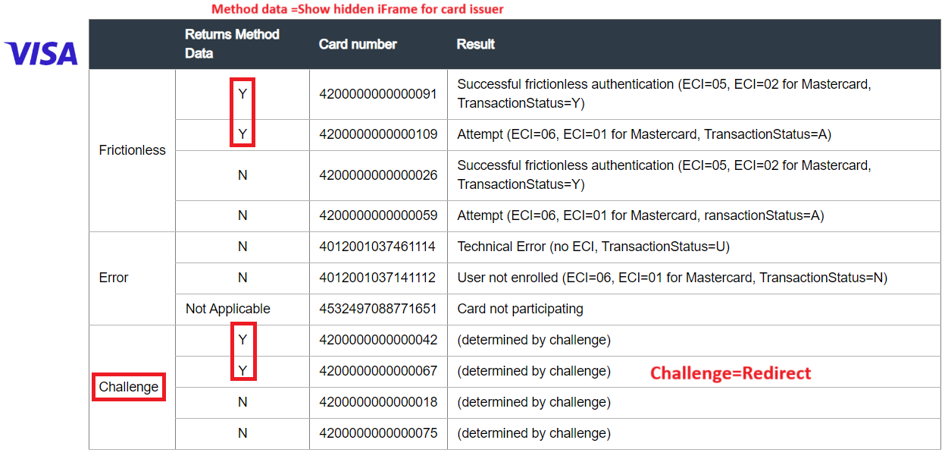
Method/precondition and redirect is important to know when you use our built in 3D Secure.
There are three options of returns in a server-to-server call.
- Final response
- Frictionless response
- Challenge with redirect link to bank
Frictionless and Challenge can both return method/ precondition data and URL.
This is a request from the card issuer to collect information about the browser used in the transaction. The card issuer is asking the merchant to show a hidden iframe to the user in order for them to be able to collect information from the browser themselves.
Method/precondition data and and URL are not always returned by the card issuer but when they are, it is important to handle it properly. The precondition data must be put to an iFrame.
To see how method data is returned, please see here.
The example shows how standalone 3DS works. For card payments it works the same way except at the end when the customer is returned to the shopperResultURL, you will get a result of the authorisation.
TEST CARDS will give you the different options that can be found here.
Important points for your integration
- When integrating, for test transactions you need to use the 3DS (3 D Secure) Simulator. See here.
- The simplest way is to use paymentType=DB (one step payment and capture) in your integration.
- It is possible to use two step payments with paymentType=PA and another server-to-server call with paymentType=CP to capture the payment. Tutorial.
- If a customer leaves during a redirect, it will take 30 minutes for the session to time out.
- Include the merchantTransactionId parameter. This is a reference number that should be unique for your transactions. This identifier is often used for reconciliation. Documentation.
- Please look carefully at the 3D Secure Guide. Getting 3D Secure to work right is among the trickiest parts of integrating SERVER to SERVER. Tutorial.
- Pending Transaction Status Codes (non-final):
See: (/^(300.100.100)/ – Soft Decline) + (/^(000.200)/. = Result codes for pending transactions) - Both entityId and Token is unique per merchant.
Webhooks
It is advised that you use webhooks to get information about how a transaction ended. If the user is not redirected to the final, receipt, page due to some network issues, webhooks will guarantee that you will receive the result of a payment.
Asynchronous events can be sent to your server with Webhooks. See tutorial here.
- You need to provide an endpoint URL (Uniform Resource Locator) and e-mail for notifications of webhook errors.
- We need to register the URL for you to use it.
- The URL must respond 200 OK to a registration call.
- Webhooks retry for 30 days to deliver the response until a 200 OK is received.
For getting unique values sent back in the webhooks that you would need to find the original order or transaction in your system, use the customParameters in your request and they will be returned by the webhook. Example customParameters[myKey]=myValue will be returned in the webhook as “customParameters”:{“SHOPPER_ myKey”:”myValue”}
Refunds & reversals
- The gateway collects transactions in a 24-hour window that ends at 22:30.
- Reversals can be done only within that time, refunds must be done after that time.
- Refunds have a higher cost, and it is slower to reach the cardholder.
Full documentation can be found here.
Test cards
3DS2.x test cards can be found here.
Access to Gateway Portal
These are the links to our Gateway Portal:
To get access to Gateway Portal, the merchant needs to confirm the first/last name and personal corporate email of each person who needs to be granted access.